
## Description

Screen capture in Stage Tamagotchi is denied before it ever reaches the
desktop picker: `navigator.mediaDevices.getDisplayMedia()` resolves with
`NotAllowedError: Permission denied`, so the vision screen-capture panel
can list sources but never start a stream.

The cause is in `shouldGrantElectronPermission`. Electron reports
**screen capture as the `media` permission**, not as `display-capture`,
and it only appends `audio`/`video` to `details.mediaTypes` for *device*
capture — so a `getDisplayMedia()` request arrives as `media` with an
**empty** `mediaTypes` list
([`web_contents_permission_helper.cc#L249-L274`](https://github.com/electron/electron/blob/v41.2.1/shell/browser/web_contents_permission_helper.cc#L249-L274)).

The handler took an early return for every `media` operation and
required audio-only details, so display capture was rejected before the
allowlisted `display-capture` entry could be consulted:

```ts
if (permission === 'media')
  return shouldGrantAudioCapturePermission(webContents, permission, requestingOrigin, details)

return LOCAL_APP_PERMISSION_NAMES.has(permission) && shouldGrantLocalAppPermission(...)
```

The fix resolves a `media` operation that declares no device media type
back to `display-capture`, so the existing allowlist and local-frame
checks decide the outcome — which is what `LOCAL_APP_PERMISSION_NAMES`
already intended:

```ts
const allowlistPermission = isDisplayCaptureMediaPermission(permission, details) ? 'display-capture' : permission

return LOCAL_APP_PERMISSION_NAMES.has(allowlistPermission)
  && shouldGrantLocalAppPermission(webContents, requestingOrigin, details)
```

Camera and microphone operations always report their device media type
(`['video']`, `['audio']`, `mediaType: 'audio'`), so they never take
this path and stay exactly as strict as before. Remote frames are still
rejected, because the local-frame check is unchanged and still applies
to display capture.

Three regression tests are added: screen capture from a local page is
granted, screen capture from a remote page is rejected, and a camera
request is still denied now that it shares the `media` permission.

## Linked Issues

Closes #2177

## Additional Context

- **Regression range.** This was introduced by #2002 (`5e8bf75`,
2026-07-10), which added the permission allowlist. Nothing on the
failing path is platform-specific — the `media` vs `display-capture`
mismatch is in Electron's browser process — so although the issue was
reported on Windows, screen capture has been broken on macOS and Linux
since that commit too. Worth noting for anyone triaging similar reports.
- **Detection signal.** The predicate keys on `mediaTypes.length === 0`
rather than on the absence of the field, so a `media` operation with
*no* `mediaTypes` at all (e.g. permission *checks*, which send
`mediaType: 'unknown'` instead) is not silently promoted to display
capture. That keeps the change to exactly the shape Electron documents
for `getDisplayMedia()` requests.
- **Deliberately out of scope.** #2104 (camera snapshot denied) is a
policy decision — whether the camera should join the allowlist — not
this bug, and #2132 (`systemPreferences.getMediaAccessStatus` undefined
on Linux) is unrelated. Happy to follow up on either if you'd like them
addressed.
- **Second layer still applies.** `setDisplayMediaRequestHandler` in
`packages/electron-screen-capture` is only installed inside the
`setSource` mutex window, so a grant here still requires the renderer to
have selected a source first. This change does not widen that.
- **Verification.** `media-permissions.test.ts` goes 16/16 → 19/19; with
only the tests applied, the new local-screen-capture case fails as
expected. Type checking and the repo ESLint config both pass clean on
the two touched files.

---------

Co-authored-by: Claude Opus 5 <noreply@anthropic.com>
Co-authored-by: autofix-ci[bot] <114827586+autofix-ci[bot]@users.noreply.github.com>

Project AIRI
Re-creating Neuro-sama, a soul container of AI waifu / virtual characters to bring them into our world.
[Join Discord Server] [Try it] [简体中文] [日本語] [Русский] [Tiếng Việt] [Français] [한국어]




Heavily inspired by Neuro-sama
Tip
On Windows, you can also install AIRI with winget:
winget install MoeruAI.AIRIOr install AIRI with Scoop:
scoop bucket add airi https://github.com/moeru-ai/airi
scoop install airi/airi
On macOS, you can install AIRI with Homebrew Cask without adding a custom tap:
brew install --cask airi
Warning
Attention: We do not have any officially minted cryptocurrency or token associated with this project. Please check the information and proceed with caution.
Note
We've got a whole dedicated organization @proj-airi for all the sub-projects born from Project AIRI. Check it out!
RAG, memory system, embedded database, icons, Live2D utilities, and more!
Tip
We have a translation project on Crowdin. If you find any inaccurate translations, feel free to contribute improvements there.

Have you dreamed about having a cyber living being (cyber waifu, digital pet) or digital companion that could play with and talk to you?
With the power of modern large language models like ChatGPT and famous Claude, asking a virtual being to roleplay and chat with us is already easy enough for everyone. Platforms like Character.ai (a.k.a. c.ai) and JanitorAI as well as local playgrounds like SillyTavern are already good-enough solutions for a chat based or visual adventure game like experience.
But, what about the abilities to play games? And see what you are coding at? Chatting while playing games, watching videos, and is capable of doing many other things.
Perhaps you know Neuro-sama already. She is currently the best virtual streamer capable of playing games, chatting, and interacting with you and the participants. Some also call this kind of being "digital human." Sadly, as it's not open sourced, you cannot interact with her after her live streams go offline.
Therefore, this project, AIRI, offers another possibility here: let you own your digital life, cyber living, easily, anywhere, anytime.
Recent DevLogs & Stories
- DevLog @ 2026.03.23: Mobile performance and game engine exploration - March 23, 2026
- DevLog @ 2026.03.14: VRM stage lifecycle, cache, and observability - March 14, 2026
- DevLog @ 2026.02.16: Dome Keeper data collection and training pipeline - February 16, 2026
- DevLog @ 2026.01.01: AIRI Pocket and FlowChat memory experiments - January 1, 2026
- DevLog @ 2025.10.20: Electron migration, new models, and Moeru AI updates - October 20, 2025
- DevLog @ 2025.08.26: Pure vision progress for airi-factorio - August 26, 2025
- DevLog @ 2025.08.05: AIRI v0.7 release highlights - August 5, 2025
- DevLog @ 2025.08.01: Streaming text animation and grapheme clusters - August 1, 2025
- DevLog @ 2025.07.18: Rethinking airi-factorio with Factorio Learning Environment - July 18, 2025
- DreamLog 0x1: The backstory of Project AIRI - June 16, 2025
- More on the documentation site
What's So Special About This Project?
Unlike the other AI driven VTuber open source projects, アイリ was built with support of many Web technologies such as WebGPU, WebAudio, Web Workers, WebAssembly, WebSocket, etc. from the first day.
Tip
Worrying about the performance drop since we are using Web related technologies?
Don't worry, while the Web browser version is meant to give an insight into how much we can push and do inside browsers and webviews, we will never fully rely on this. The desktop version of AIRI is capable of using native NVIDIA CUDA and Apple Metal by default (thanks to HuggingFace & the beloved candle project), without any complex dependency management. Considering the tradeoff, it is partially powered by Web technologies for graphics, layouts, animations, and the WIP plugin system for everyone to integrate things.
This means that アイリ is capable of running on modern browsers and devices and even on mobile devices (already done with PWA support). This brings a lot of possibilities for us (the developers) to build and extend the power of アイリ VTuber to the next level, while still leaving the flexibility for users to enable features that require TCP connections or other non-Web technologies such as connecting to a Discord voice channel or playing Minecraft and Factorio with friends.
Note
We are still in the early stage of development where we are seeking out talented developers to join us and help us to make アイリ a reality.
It's ok if you are not familiar with Vue.js, TypeScript, and devtools required for this project, you can join us as an artist, designer, or even help us to launch our first live stream.
Even if you are a big fan of React, Svelte or even Solid, we welcome you. You can open a sub-directory to add features that you want to see in アイリ, or would like to experiment with.
Fields (and related projects) that we are looking for:
- Live2D modeller
- VRM modeller
- VRChat avatar designer
- Computer Vision
- Reinforcement Learning
- Speech Recognition
- Speech Synthesis
- ONNX Runtime
- Transformers.js
- vLLM
- WebGPU
- Three.js
- WebXR (checkout the another project we have under the @moeru-ai organization)
If you are interested, why not introduce yourself here? Would like to join part of us to build AIRI?
Current Progress & Roadmap
Capable of
- Brain
- Play Minecraft
- Play Factorio (WIP, but PoC and demo available)
- Play Kerbal Space Program (announcement TBD)
- Co-play Helldivers 2 (WIP)
- Chat in Telegram
- Chat in Discord
- Memory
- Pure in-browser database support (DuckDB WASM |
pglite) - Memory Alaya (WIP)
- Pure in-browser database support (DuckDB WASM |
- Pure in-browser local (WebGPU) inference
- Ears
- Audio input from browser
- Audio input from Discord
- Client side speech recognition
- Client side talking detection
- Mouth
- Multi-provider voice synthesis, including ElevenLabs, Microsoft/Azure Speech, OpenAI-compatible TTS, Alibaba Cloud Model Studio, and local Kokoro TTS
- Body
- VRM support
- Control VRM model
- VRM model animations
- Auto blink
- Auto look at
- Idle eye movement
- Live2D support
- Control Live2D model
- Live2D model animations
- Auto blink
- Auto look at
- Idle eye movement
- VRM support
Development
For detailed instructions to develop this project, follow CONTRIBUTING.md
Note
By default,
pnpm devwill start the development server for the Stage Web (browser version). If you would like to try developing the desktop version, please make sure you read CONTRIBUTING.md to setup the environment correctly.
pnpm i
pnpm dev
Stage Web (Browser Version at airi.moeru.ai)
pnpm dev
Stage Tamagotchi (Desktop Version)
pnpm dev:tamagotchi
A Nix package for Tamagotchi is included. To run airi with Nix, first make sure to enable flakes, then run:
nix run github:moeru-ai/airi
NixOS
Electron requires shared libraries that aren't in standard paths on NixOS. Use the FHS shell defined in flake.nix:
nix develop .#fhs
pnpm dev:tamagotchi
Stage Pocket (Mobile Version)
Start the development server for the capacitor:
pnpm dev:pocket:ios --target <DEVICE_ID_OR_SIMULATOR_NAME>
# Or
CAPACITOR_DEVICE_ID_IOS=<DEVICE_ID_OR_SIMULATOR_NAME> pnpm dev:pocket:ios
You can see the list of available devices and simulators by running pnpm exec cap run ios --list.
If you need to connect server channel on pocket in wireless mode, you need to start tamagotchi as root:
sudo pnpm dev:tamagotchi
Then enable secure websocket in tamagotchi settings/connections.
Documentation Site
pnpm dev:docs
Publish
Run bumpp to update the monorepo version:
npx bumpp --no-commit --no-tag
Support of LLM API Providers (powered by xsai)
- AIHubMix (recommended)
- OpenRouter
- vLLM
- SGLang
- Ollama
- 302.AI (sponsored)
- OpenAI
- Anthropic Claude
- AWS Claude (PR welcome)
- DeepSeek
- Qwen
- Google Gemini
- xAI
- Groq
- Mistral
- Cloudflare Workers AI
- Together.ai
- Fireworks.ai
- Novita
- Zhipu
- SiliconFlow
- Stepfun
- Baichuan
- Minimax
- Moonshot AI
- ModelScope
- Player2
- Tencent Cloud
- Sparks (PR welcome)
- Volcano Engine (PR welcome)
- Xiaomi Mimo
Sub-projects Born from This Project
- Awesome AI VTuber: A curated list of AI VTubers and related projects
unspeech: Universal endpoint proxy server for/audio/transcriptionsand/audio/speech, like LiteLLM but for any ASR and TTShfup: tools to help on deploying, bundling to HuggingFace Spacesxsai-transformers: Experimental 🤗 Transformers.js provider for xsAI.- WebAI: Realtime Voice Chat: Full example of implementing ChatGPT's realtime voice from scratch with VAD + STT + LLM + TTS.
@proj-airi/drizzle-duckdb-wasm: Drizzle ORM driver for DuckDB WASM@proj-airi/duckdb-wasm: Easy to use wrapper for@duckdb/duckdb-wasm- AIRI Factorio: Allow AIRI to play Factorio.
- AIRI DomeKeeper: Allow AIRI to play DomeKeeper.
- Factorio RCON API: RESTful API wrapper for Factorio headless server console
autorio: Factorio automation librarytstl-plugin-reload-factorio-mod: Reload Factorio mod when developing- Velin: Use Vue SFC and Markdown to write easy to manage stateful prompts for LLM
demodel: Easily boost the speed of pulling your models and datasets from various of inference runtimes.inventory: Centralized model catalog and default provider configurations backend service- MCP Launcher: Easy to use MCP builder & launcher for all possible MCP servers, just like Ollama for models!
- 🥺 SAD: Documentation and notes for self-host and browser running LLMs.
%%{ init: { 'flowchart': { 'curve': 'catmullRom' } } }%%

flowchart TD
  Core("Core")
  Unspeech("unspeech")
  DBDriver("@proj-airi/drizzle-duckdb-wasm")
  MemoryDriver("[WIP] Memory Alaya")
  DB1("@proj-airi/duckdb-wasm")
  SVRT("@proj-airi/server-runtime")
  Memory("Memory")
  STT("STT")
  Stage("Stage")
  StageUI("@proj-airi/stage-ui")
  UI("@proj-airi/ui")

  subgraph AIRI
    DB1 --> DBDriver --> MemoryDriver --> Memory --> Core
    UI --> StageUI --> Stage --> Core
    Core --> STT
    Core --> SVRT
  end

  subgraph UI_Components
    UI --> StageUI
    UITransitions("@proj-airi/ui-transitions") --> StageUI
    UILoadingScreens("@proj-airi/ui-loading-screens") --> StageUI
    FontCJK("@proj-airi/font-cjkfonts-allseto") --> StageUI
    FontXiaolai("@proj-airi/font-xiaolai") --> StageUI
  end

  subgraph Apps
    Stage --> StageWeb("@proj-airi/stage-web")
    Stage --> StageTamagotchi("@proj-airi/stage-tamagotchi")
    Core --> RealtimeAudio("@proj-airi/realtime-audio")
    Core --> PromptEngineering("@proj-airi/playground-prompt-engineering")
  end

  subgraph Server_Components
    Core --> ServerSDK("@proj-airi/server-sdk")
    ServerShared("@proj-airi/server-shared") --> SVRT
    ServerShared --> ServerSDK
  end

  STT -->|Speaking| Unspeech
  SVRT -->|Playing Factorio| F_AGENT
  SVRT -->|Playing Minecraft| MC_AGENT

  subgraph Factorio_Agent
    F_AGENT("Factorio Agent")
    F_API("Factorio RCON API")
    factorio-server("factorio-server")
    F_MOD1("autorio")

    F_AGENT --> F_API -.-> factorio-server
    F_MOD1 -.-> factorio-server
  end

  subgraph Minecraft_Agent
    MC_AGENT("Minecraft Agent")
    Mineflayer("Mineflayer")
    minecraft-server("minecraft-server")

    MC_AGENT --> Mineflayer -.-> minecraft-server
  end

  XSAI("xsAI") --> Core
  XSAI --> F_AGENT
  XSAI --> MC_AGENT

  Memory_PGVector("@proj-airi/memory-pgvector") --> Memory

  style Core fill:#f9d4d4,stroke:#333,stroke-width:1px
  style AIRI fill:#fcf7f7,stroke:#333,stroke-width:1px
  style UI fill:#d4f9d4,stroke:#333,stroke-width:1px
  style Stage fill:#d4f9d4,stroke:#333,stroke-width:1px
  style UI_Components fill:#d4f9d4,stroke:#333,stroke-width:1px
  style Server_Components fill:#d4e6f9,stroke:#333,stroke-width:1px
  style Apps fill:#d4d4f9,stroke:#333,stroke-width:1px
  style Factorio_Agent fill:#f9d4f2,stroke:#333,stroke-width:1px
  style Minecraft_Agent fill:#f9d4f2,stroke:#333,stroke-width:1px

  style DBDriver fill:#f9f9d4,stroke:#333,stroke-width:1px
  style MemoryDriver fill:#f9f9d4,stroke:#333,stroke-width:1px
  style DB1 fill:#f9f9d4,stroke:#333,stroke-width:1px
  style Memory fill:#f9f9d4,stroke:#333,stroke-width:1px
  style Memory_PGVector fill:#f9f9d4,stroke:#333,stroke-width:1px
Similar Projects
Open sourced ones
- kimjammer/Neuro: A recreation of Neuro-Sama originally created in 7 days.: very well completed implementation.
- SugarcaneDefender/z-waif: Great at gaming, autonomous, and prompt engineering
- semperai/amica: Great at VRM, WebXR
- elizaOS/eliza: Great examples and software engineering on how to integrate agent into various of systems and APIs
- ardha27/AI-Waifu-Vtuber: Great about Twitch API integrations
- InsanityLabs/AIVTuber: Nice UI and UX
- IRedDragonICY/vixevia
- t41372/Open-LLM-VTuber
- PeterH0323/Streamer-Sales
Non-open-sourced ones
- https://clips.twitch.tv/WanderingCaringDeerDxCat-Qt55xtiGDSoNmDDr https://www.youtube.com/watch?v=8Giv5mupJNE
- https://clips.twitch.tv/TriangularAthleticBunnySoonerLater-SXpBk1dFso21VcWD
- https://www.youtube.com/@NOWA_Mirai
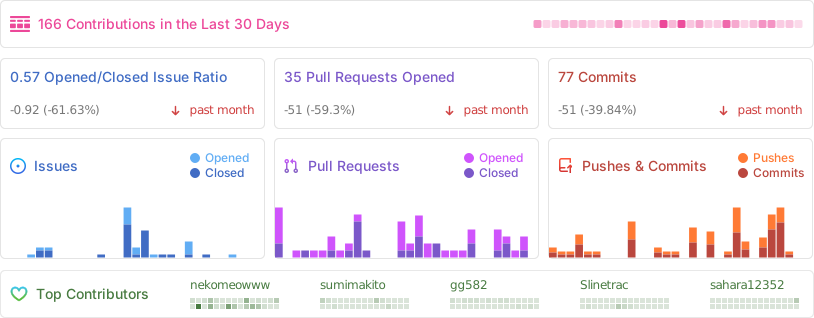
Project Status
Acknowledgements
- Reka UI: for designing the documentation site, the new landing page is based on this, as well as implementing a massive amount of UI components. (shadcn-vue is using Reka UI as the headless, do checkout!)
- pixiv/ChatVRM
- josephrocca/ChatVRM-js: A JS conversion/adaptation of parts of the ChatVRM (TypeScript) code for standalone use in OpenCharacters and elsewhere
- Design of UI and style was inspired by Cookard, UNBEATABLE, and Sensei! I like you so much!, and artworks of Ayame by Mercedes Bazan with Wish by Mercedes Bazan
- mallorbc/whisper_mic
xsai: Implemented a decent amount of packages to interact with LLMs and models, like Vercel AI SDK but way small.
Supporters
Thank you for supporting Project AIRI through OpenCollective, Patreon, and Ko-fi.

Special Thanks
Special thanks to all contributors for their contributions to Project AIRI ❤️